

THE FIGURENOOK FIELD GUIDE · Electronics
A holiday music request station with an Echo Dot
Use this four-part checklist to record the recipient’s needs, check the exact model’s documentation and prepare a useful gift or handover.
Free instructions. No account or email required.
YOUR FREE PRINTABLE
See what you’ll get.
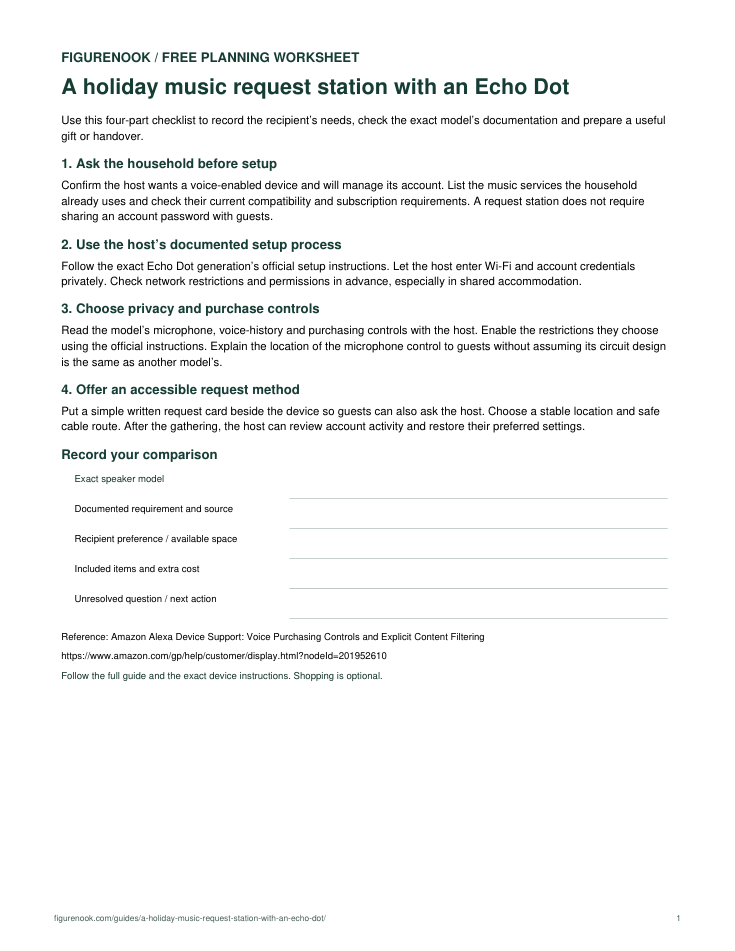
A host planning worksheet for the device, requirements, costs and open questions. Make separate request cards if desired. Preview of the actual printable.
The preview shows the actual PDF workspace page. Download it free, with no account, email or purchase required. Print a trial page to check the layout.
Download the free printable and guide (PDF)THE METHOD
One step at a time
Ask the household before setup
Confirm the host wants a voice-enabled device and will manage its account. List the music services the household already uses and check their current compatibility and subscription requirements. A request station does not require sharing an account password with guests.
Use the host’s documented setup process
Follow the exact Echo Dot generation’s official setup instructions. Let the host enter Wi-Fi and account credentials privately. Check network restrictions and permissions in advance, especially in shared accommodation.
Choose privacy and purchase controls
Read the model’s microphone, voice-history and purchasing controls with the host. Enable the restrictions they choose using the official instructions. Explain the location of the microphone control to guests without assuming its circuit design is the same as another model’s.
Offer an accessible request method
Put a simple written request card beside the device so guests can also ask the host. Choose a stable location and safe cable route. After the gathering, the host can review account activity and restore their preferred settings.
FEATURED PRODUCT
2022 Echo Dot 5th Gen Smart Speaker | Charcoal | Amazon
Affiliate link. As an Amazon Associate I earn from qualifying purchases.
Check the selected option, current price and delivery on Amazon. The guide and downloads are free; no purchase is required.
OPTIONAL FEATURED ITEM
Optional item for this project
Use what you already have. The optional featured link opens Amazon; check actual photos, dimensions, included pieces, and instructions. These are project planning ideas and concept illustrations.
Affiliate links. As an Amazon Associate I earn from qualifying purchases.
2022 Echo Dot 5th Gen Smart Speaker | Charcoal | Amazon
Optional featured product. Selected research option: 2022 Echo Dot 5th Gen Smart Speaker | Charcoal | Amazon. Check the actual listing and maker directions; image is illustrative and accessories may be separate.
Shop this item on Amazon (opens in a new tab)
Shop 2022 Echo Dot 5th Gen Smart Speaker | Charcoal | Amazon on Amazon ↗ (opens in a new tab)
Compare specifications and current prices on Amazon before buying. The guide and checklist on this page are free.
Make it work for you
- Record a supporting manual page or official specification beside each requirement. Leave an unknown field unresolved until confirmed.
- Keep account credentials private and let the recipient complete personal setup.
Original AI editorial illustration, not an exact product photograph or hands-on review. Follow actual product directions.
Source: Amazon Alexa Device Support: Voice Purchasing Controls and Explicit Content Filtering. Consult the linked official guidance for the exact model or requirement. The worksheet organizes a comparison; it does not establish performance from a generic specification.
Guide published October 28, 2026. Tell us about an error or unclear step.
← All creative guides · FigureNook on Pinterest (opens in a new tab)