

THE FIGURENOOK FIELD GUIDE · Electronics
Holiday movie night: make a Fire TV remote reference card for guests
Use this four-part checklist to record the recipient’s needs, check the exact model’s documentation and prepare a useful gift or handover.
Free instructions. No account or email required.
YOUR FREE PRINTABLE
See what you’ll get.
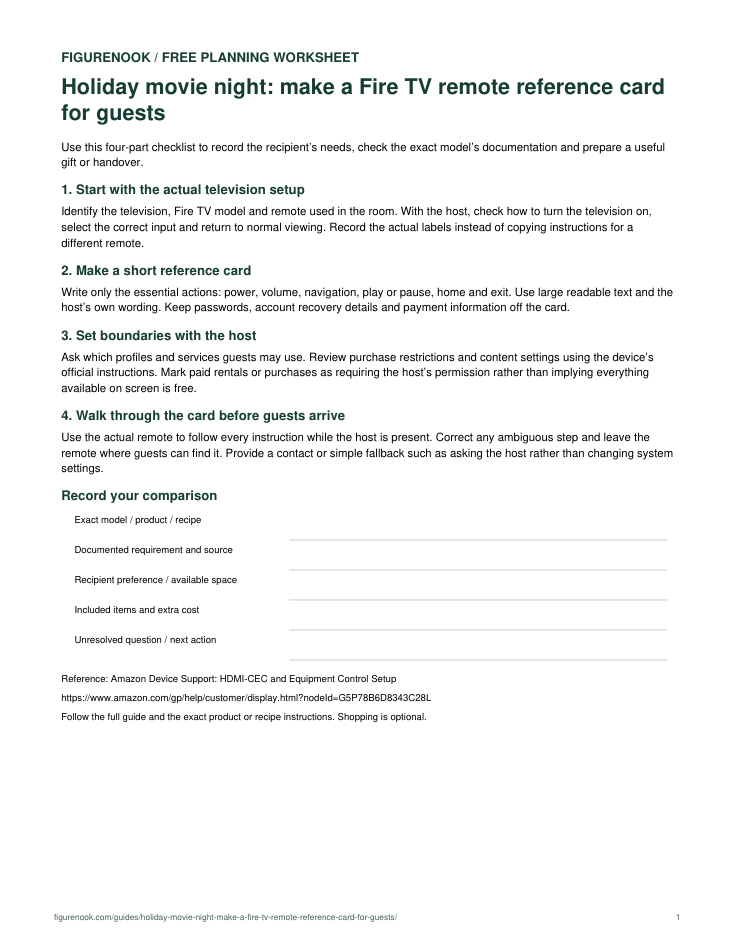
A large-print remote reference and movie-vote card; confirm model-specific controls. Preview of the actual matching printable.
The preview shows the actual PDF workspace page. Download it free, with no account, email or purchase required. Print a trial page to check the layout.
Download the free printable and guide (PDF)THE METHOD
One step at a time
Start with the actual television setup
Identify the television, Fire TV model and remote used in the room. With the host, check how to turn the television on, select the correct input and return to normal viewing. Record the actual labels instead of copying instructions for a different remote.
Make a short reference card
Write only the essential actions: power, volume, navigation, play or pause, home and exit. Use large readable text and the host’s own wording. Keep passwords, account recovery details and payment information off the card.
Set boundaries with the host
Ask which profiles and services guests may use. Review purchase restrictions and content settings using the device’s official instructions. Mark paid rentals or purchases as requiring the host’s permission rather than implying everything available on screen is free.
Walk through the card before guests arrive
Use the actual remote to follow every instruction while the host is present. Correct any ambiguous step and leave the remote where guests can find it. Provide a contact or simple fallback such as asking the host rather than changing system settings.
FEATURED PRODUCT
Fire TV Stick 4K Select streaming device | Amazon
Affiliate link. As an Amazon Associate I earn from qualifying purchases.
Check the selected option, current price and delivery on Amazon. The guide and downloads are free; no purchase is required.
OPTIONAL FEATURED ITEM
Optional item for this project
Use what you already have. The optional featured link opens Amazon; check actual photos, dimensions, included pieces, and instructions. These are project planning ideas and concept illustrations.
Affiliate links. As an Amazon Associate I earn from qualifying purchases.
Fire TV Stick 4K Select streaming device | Amazon
Optional featured product. Selected research option: Fire TV Stick 4K Select streaming device | Amazon. Check the actual listing and maker directions; image is illustrative and accessories may be separate.
Shop this item on Amazon (opens in a new tab)
Shop Fire TV Stick 4K Select streaming device | Amazon on Amazon ↗ (opens in a new tab)
Compare specifications and current prices on Amazon before buying. The guide and checklist on this page are free.
Make it work for you
- Record a supporting manual page or official specification beside each requirement. Leave an unknown field unresolved until confirmed.
- Keep account credentials private and let the recipient complete personal setup.
Original AI editorial illustration, not an exact product photograph or hands-on review. Follow actual product directions.
Source: Amazon Device Support: HDMI-CEC and Equipment Control Setup. Consult the linked official guidance for the exact model or requirement. The worksheet organizes a comparison; it does not establish performance from a generic specification.
Guide published October 28, 2026. Tell us about an error or unclear step.
← All creative guides · FigureNook on Pinterest (opens in a new tab)