

THE FIGURENOOK FIELD GUIDE · Electronics
Laptop power-bank gifts: match USB-C wattage before packing
Use this four-part checklist to match the exact laptop, output port, cable and travel requirements before choosing a power bank.
Free instructions. No account or email required.
YOUR FREE PRINTABLE
See what you’ll get.
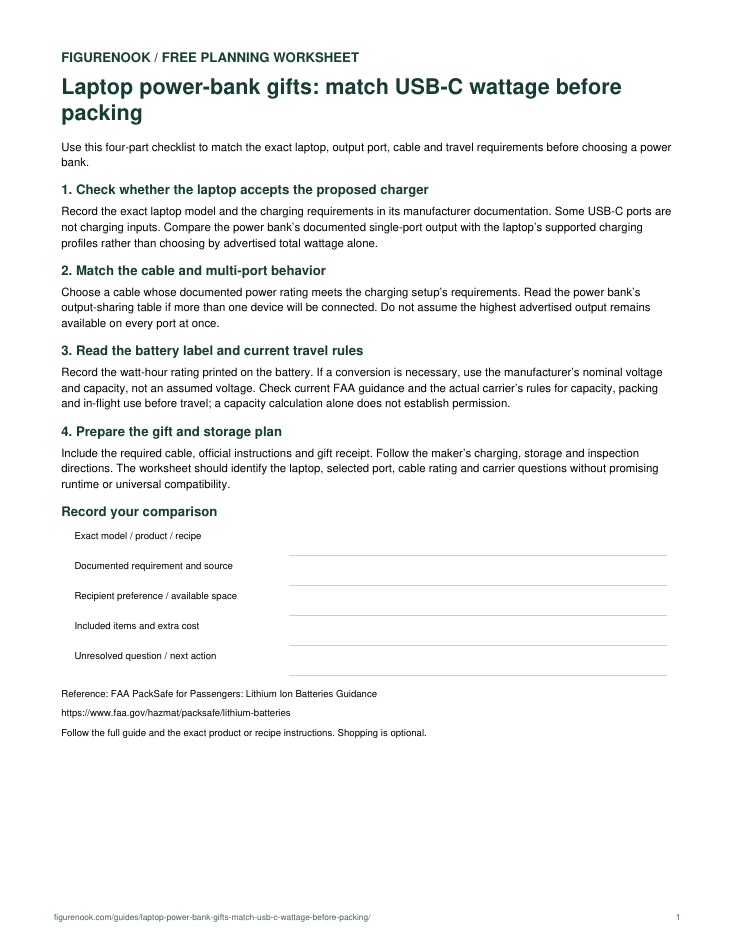
Device-wattage and cable comparison card; confirm airline-specific battery rules. Preview of the actual matching printable.
The preview shows the actual PDF workspace page. Download it free, with no account, email or purchase required. Print a trial page to check the layout.
Download the free printable and guide (PDF)THE METHOD
One step at a time
Check whether the laptop accepts the proposed charger
Record the exact laptop model and the charging requirements in its manufacturer documentation. Some USB-C ports are not charging inputs. Compare the power bank’s documented single-port output with the laptop’s supported charging profiles rather than choosing by advertised total wattage alone.
Match the cable and multi-port behavior
Choose a cable whose documented power rating meets the charging setup’s requirements. Read the power bank’s output-sharing table if more than one device will be connected. Do not assume the highest advertised output remains available on every port at once.
Read the battery label and current travel rules
Record the watt-hour rating printed on the battery. If a conversion is necessary, use the manufacturer’s nominal voltage and capacity, not an assumed voltage. Check current FAA guidance and the actual carrier’s rules for capacity, packing and in-flight use before travel; a capacity calculation alone does not establish permission.
Prepare the gift and storage plan
Include the required cable, official instructions and gift receipt. Follow the maker’s charging, storage and inspection directions. The worksheet should identify the laptop, selected port, cable rating and carrier questions without promising runtime or universal compatibility.
FEATURED PRODUCT
Anker laptop power bank, 25,000 mAh, 165W total output
Affiliate link. As an Amazon Associate I earn from qualifying purchases.
Check the selected option, current price and delivery on Amazon. The guide and downloads are free; no purchase is required.
OPTIONAL FEATURED ITEM
Optional item for this project
Use what you already have. The optional featured link opens Amazon; check actual photos, dimensions, included pieces, and instructions. These are project planning ideas and concept illustrations.
Affiliate links. As an Amazon Associate I earn from qualifying purchases.
Anker laptop power bank, 25,000 mAh, 165W total output
Optional featured product. Selected research option: Three USB-C ports; built-in retractable cables; verify current listing. Check the actual listing and maker directions; image is illustrative and accessories may be separate.
Shop this item on Amazon (opens in a new tab)
Shop Anker laptop power bank, 25,000 mAh, 165W total output on Amazon ↗ (opens in a new tab)
Compare specifications and current prices on Amazon before buying. The guide and checklist on this page are free.
Make it work for you
- Record a supporting manual page or official specification beside each requirement. Leave an unknown field unresolved until confirmed.
- Keep account credentials private and let the recipient complete personal setup.
Original AI editorial illustration, not an exact product photograph or hands-on review. Follow actual product directions.
Source: FAA PackSafe for Passengers: Lithium Ion Batteries Guidance. Consult the linked official guidance for the exact model or requirement. The worksheet organizes a comparison; it does not establish performance from a generic specification.
Guide published October 28, 2026. Tell us about an error or unclear step.
← All creative guides · FigureNook on Pinterest (opens in a new tab)